Blog

  • Why Use Virtual Training For Team Building

    Why Use Virtual Training For Team Building

    The world of work, especially in IT, is constantly evolving. From hybrid work to new technologies, security breaches to advances in processes – it’s a fast-moving world. To stay competitive, IT professionals must be able to quickly adapt to new technologies and be able to collaborate effectively with team members.
    Virtual training provides a platform for team members to learn and work together, even if they are located in different parts of the world. Consequently, virtual training is becoming an important tool for building strong teams for IT professionals.
    Virtual training is a type of online education that allows learners to participate in activities from a remote location, using technology such as video conferencing and web-based programs. Virtual training can help IT professionals to build strong teams by fostering collaboration, improving communication, and developing problem-solving skills. It can also lead to increased efficiency and cost savings.

    What are the benefits of using virtual training?

    Collaboration and team building
    One of the major benefits of virtual training is increased collaboration. Virtual training helps to break down barriers between teams and facilitates collaboration among members. By allowing team members to work together in a virtual environment, they can easily share ideas and resources, which can lead to more productive outcomes.
    Communication skills
    Communication is another key benefit of virtual training. Virtual training provides a platform for team members to communicate with each other more effectively. This is especially helpful for teams that are spread out geographically, as it eliminates the need for long-distance phone calls or emails. Additionally, virtual training allows team members to respond quickly to each other when needed, which can help improve productivity.
    Strategic thinking
    Virtual training also enhances problem-solving skills. By encouraging participants to think outside the box, teams can come up with creative solutions to problems that may arise. This can help IT professionals be better prepared for any potential challenges that may come up during projects.
    Furthermore, virtual training leads to increased efficiency. Having team members work together in a virtual environment allows tasks to be completed quickly and efficiently. This helps reduce the time spent on each task, saving both time and money.
    Cost-effective training
    Finally, virtual training eliminates the need for travel expenses and other overhead costs associated with traditional training. By cutting out these expenses, businesses can save money and allocate more resources towards other areas, such as further team-building activities.

    How to implement virtual training

    User experience
    When implementing virtual training, choosing the right platform or provider is important. Virtual training needs to be user-friendly and will develop the skills your organisation needs. Additionally, it is crucial to create effective virtual training materials that are engaging, interactive, and tailored to the needs of your team.
    Company values
    Each team will have different requirements, with company core values at the heart of the group – so virtual training that matches the values of the organisation can strengthen the team and foster a real bond.
    As a result, it is wise to consider what the organisation needs from virtual training – does it need tailoring, will team tasks work well, and what sized groups can benefit from training activities?
    Goal setting for virtual training
    It is also important to establish a timeline and goals when implementing virtual training. Set realistic goals and create a timeline for completing the virtual training activities. This will help ensure that all team members are on the same page and can meet their goals in a timely manner.
    Platform and tools
    Additionally, there are a variety of online tools that can help facilitate virtual training, such as video conferencing, webinars, and online polls. Utilising these tools can help keep team members engaged and give them opportunities to interact with each other in real-time.
    Finally, providing feedback is an essential part of any successful virtual training program. Providing regular feedback and encouraging team members to provide feedback to each other will help ensure that all team members are on the same page and can work together effectively.

    Implementing virtual training to strengthen your team

    In conclusion, virtual training is an effective way for IT professionals to build strong teams by enhancing collaboration, improving communication, developing problem-solving skills, increasing efficiency, and saving on costs.
    When implementing virtual training, it is important to choose the right platform, develop effective materials, establish a timeline and goals, utilise online tools, and provide feedback. Virtual training offers many advantages for IT professionals by helping them create cohesive teams that can work together effectively.
    If you’re looking to strengthen your team and increase their skills with virtual training, TSG Training offers a huge variety of online training that can upskill your team and create a fun, engaging and interactive delivery that can be ideal for team building too. To find out more about utilising virtual training in your organisation and seeing the team building benefits too, speak to TSG Training today.


  • How Cybersecurity Certification Unlocks A Wealth Of Career Opportunities

    How Cybersecurity Certification Unlocks A Wealth Of Career Opportunities

    The average enterprise experiences 130 security breaches per year. Furthermore, the number of breaches that occur each year increased by over 27%. In the UK, 39% of businesses have experienced a cyber-attack, with one in five businesses reporting a sophisticated cyber threat such as malware on ransomware.
    With this in mind, more and more businesses are setting aside a significant amount of their budget to bolster their cybersecurity protection – this includes recruiting talented individuals to serve as cybersecurity team members and consultants to help protect their companies. With cyber hygiene becoming a vital part of businesses, there is a growing demand for certified cybersecurity professionals.

    Why get certified in cybersecurity?

    Cybersecurity certification is becoming essential for careers in IT security. Certification can certify your knowledge of cybersecurity and show employers that you are dedicated to the field. Furthermore, the world of cybersecurity is constantly evolving, and certification can help you stay up-to-date on the latest cybersecurity trends and technologies.
    Ultimately, certification can give you a competitive edge when applying for jobs or promotions.

    What is the growth of cybersecurity in the UK?

    The UK is a world leader in cybersecurity. As a result, there is a wealth of opportunities for those with the right skills and certification. Cybersecurity is one of the fastest-growing industries in the UK, with demand for qualified professionals far outstripping supply. Certification is essential for anyone looking to enter the cybersecurity field, giving you the skills and knowledge needed to protect businesses from online threats.
    A wide range of cybersecurity certifications are available, so you can find one that suits your skillset and career aspirations. With proper certification, you can open up a world of opportunities in the exciting and ever-changing field of cybersecurity with many benefits to boot.

    What are the benefits of having cybersecurity certification?

    Earning a cybersecurity certification can help you qualify for a variety of in-demand jobs. With the right credentials, you can work in a wide range of industries, from government to business to health care.
    Cybersecurity certifications can also give you the skills and knowledge necessary to protect organisations from online threats. They teach you how to identify and deal with common threats and equip you with the tools needed to stay ahead of future developments.
    Certification programs can also help you network with other professionals in the field and stay up-to-date on best practices. By attending events or networking with others who have certified, you’ll learn what’s new and important in cybersecurity – which will benefit your career long-term.
    A cybersecurity certification can ultimately help you advance your career and finances too. Because so many companies now require this level of expertise, having an industry-recognised credential does provide a competitive edge.

    What types of jobs and opportunities are available to those with a certification?

    Cybersecurity is one of the most in-demand fields today, and having a certification can help you stand out from the crowd. There are a variety of jobs and career paths available in cybersecurity, so finding the right fit for your skillset is crucial.
    With a certification, you can pursue positions in both the public and private sectors, from startups to large corporations. In terms of job satisfaction, studies have shown that workers in cybersecurity are some of the happiest with their careers choice.
    And finally, don’t forget that salary potential in this field is also very high – according to recent studies, certified cybersecurity professionals earn an average of 20% more than those without a certification. So if you’re passionate about cyber security and want to make a difference on the global stage, consider pursuing a certification. It could be the key to unlocking all sorts of opportunities – whether within the organisation, you’re currently with or starting your own cybersecurity business.

    How can you get started on getting certified?

    Certifications can unlock a wealth of opportunities. By demonstrating your knowledge and expertise in cybersecurity, you can establish yourself as a credible resource for businesses and organisations looking to protect their information systems.
    To get certified, TSG Training offers a wide variety of IT security certifications to suit a range of requirements.
    For example, if you’re getting started in IT security, a course such as AWS Security Essentials covers the fundamentals of AWS.
    Alternatively, TSG Training offers cloud security courses such as the in-depth Certified Cloud Security Professional (CCSP) Training Course, which offers industry-leading certification ideal for those working on and within cloud service architecture.
    As well as security courses, TSG Training has a range of Cisco courses, many of which can help bolster cybersecurity skills, such as Implementing Secure Solutions with Virtual Private Networks. If you need support finding the right certifications for your cybersecurity career, TSG Training can help you find the right course to suit your journey and career progression. Call the team for a friendly chat or drop TSG Training a line here.
    Ultimately, it is estimated that there will be 3.5 million unfilled cybersecurity jobs in the next three years. As a result, getting certified can help you to map out your ideal career path with plenty of opportunities available.

  • Who to Train and When

    Who to Train and When

    The question of who to train and when is one that every organisation faces. As technology evolves rapidly and business demands shift, ensuring that your workforce has the right blend of skills and competencies has never been more critical.

    However, many companies ask only half the question. It is not just about who to train, but also how to blend and develop skills strategically to maximise flexibility, performance, and long-term capability.

    Employers today must build teams with multiple skill sets. The era of lifelong single-specialisation roles has passed. Instead, a focus on developing primary, secondary, and even tertiary skills can help businesses stay agile, competitive, and resilient.

    This article explores how to identify, train, and manage skills within your workforce, with insights on how TSG Training can help you close skills gaps through targeted business and IT training courses.

    Why Building a Skills Database Is Essential

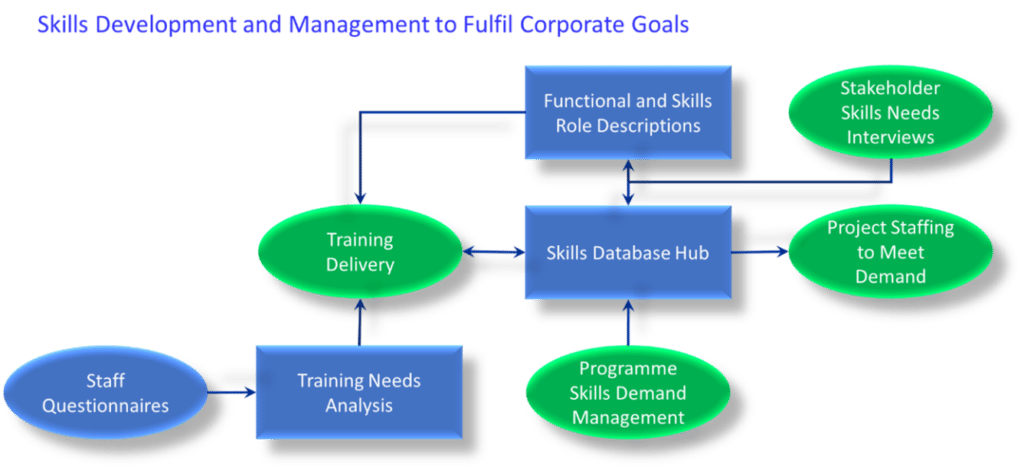
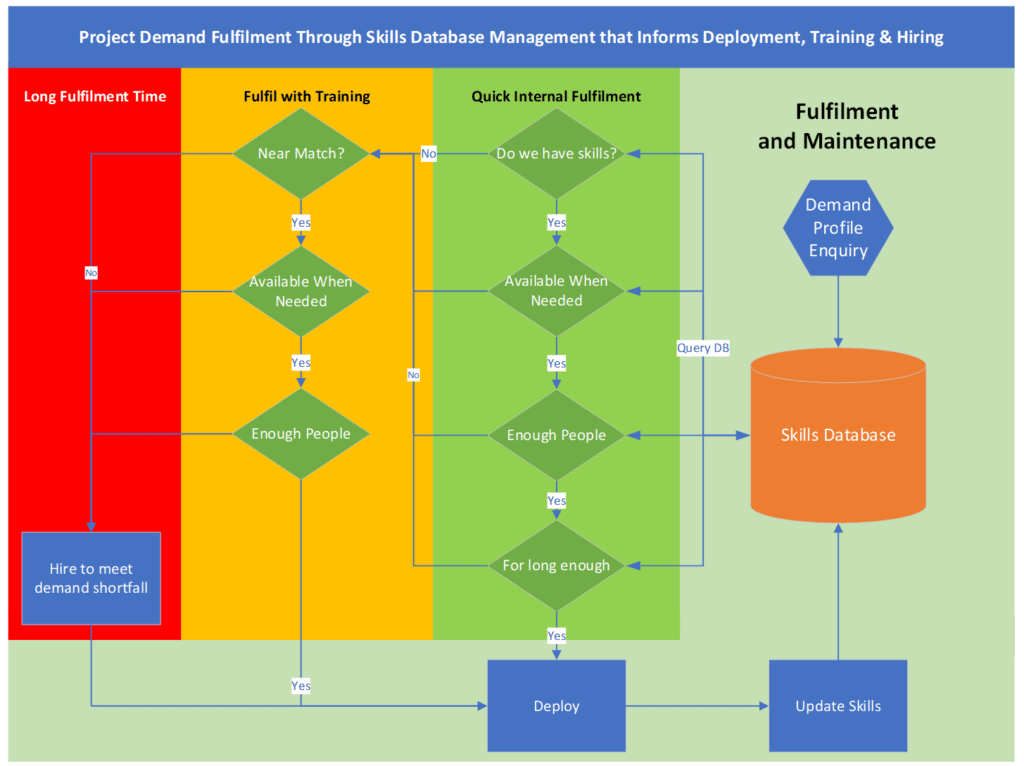
    A well-designed skills database is one of the most powerful tools an organisation can have. It allows you to record, monitor, and manage every employee’s skills, experience, and availability.

    Such a database helps you answer critical questions such as:

    • Can we meet the skills demand profile for upcoming projects?

    • Which employees can be trained in time to fill gaps?

    • What new training initiatives are needed, and when?

    • Should we hire new staff or train existing employees?

    By managing this data effectively, you can make informed decisions on staffing, training, and recruitment.

    Identifying What Skills Are Needed

    The first step in any workforce development plan is to understand what skills are required to deliver your business objectives. When assessing your needs, consider:

    1. Project requirements and timelines

    2. Emerging technologies or methodologies

    3. Cross-functional collaboration needs

    4. Leadership and communication skills

    For example, if you are delivering a complex IT transformation, you may need individuals skilled in software testing, project management, and business analysis.

    You can explore accredited programmes such as the BCS Foundation Certificate in Business Analysis or the ISTQB Certified Tester Foundation Level course to ensure your teams have the technical and analytical expertise needed for success.

    Creating and Maintaining Functional Role Descriptions

    Alongside identifying skills, maintaining accurate role descriptions ensures that the right people are assigned to the right roles.

    For example, the term “performance skills” might refer to very different roles:

    • A Performance Strategist who designs system architecture.

    • A Performance Modeler who analyses data patterns and transactions.

    • A Performance Engineer who uses tools to verify system performance.

    Each of these roles requires distinct skills and levels of expertise. Keeping role descriptions updated helps clarify responsibilities and supports accurate resource planning.

    The Importance of Training Needs Analysis

    A Training Needs Analysis (TNA) provides a structured approach to workforce development. It helps organisations identify gaps between current skills and future business requirements.

    A comprehensive TNA should include:

    • A full list of skills and competencies required

    • An assessment of current employee skill levels

    • An understanding of individual career aspirations

    • A gap analysis to inform hiring or training plans

    Once completed, the TNA serves as a roadmap for targeted training initiatives. It ensures that investments in professional development align with business objectives and timelines.

    TSG Training’s business analysis and software testing courses are designed to complement TNA outcomes by addressing real-world skill gaps in IT and digital transformation.

    Engaging Stakeholders in Skills Development

    Stakeholders play a vital role in defining the skills needed for success. They understand the specific requirements of their departments and projects.

    Engage stakeholders through interviews, surveys, or collaborative workshops to identify:

    • Current skills being used

    • Anticipated future needs

    • Gaps affecting performance or delivery

    Combining stakeholder insights with employee data will provide a holistic view of your organisation’s capabilities.

    Capturing Employee Skills and Ambitions

    Many employees possess hidden skills that managers may not be aware of. Encourage staff to self-report their expertise through questionnaires or digital profiles.

    This not only uncovers untapped potential but also boosts morale and engagement. Employees who see their skills recognised are more motivated to develop further.

    TSG Training supports this process through flexible online learning and corporate training solutions designed to help organisations upskill at scale.

    Project and Skills Demand Management

    Effective demand management means anticipating what skills will be needed, not just reacting to immediate project requirements.

    Project managers should consider:

    • Which skills and experience are required

    • When they are needed and for how long

    • Whether current staff can meet the need or require training

    Early identification of skills demand allows enough time to train or rotate existing employees rather than relying on external hiring.

    Maintaining Your Skills Database

    A skills database is only as good as the data it contains. Continuous maintenance is essential to ensure accuracy and relevance.

    It should answer vital questions such as:

    • What skills do we currently have, and where?

    • What training is required to fill upcoming gaps?

    • When should we hire or retrain?

    • Which skills are becoming redundant and can be repurposed?

    Regular updates turn your database into a strategic asset that improves workforce planning and reduces turnover.

    To support this process, consider developing an ongoing partnership with TSG Training to ensure continuous learning and development across your organisation.

  • Top Network Automation Tricks

    Top Network Automation Tricks

    Network automation has become a key part of network management, allowing you to manage your network devices, servers and other assets efficiently. It’s key to increasing efficiency, reducing human error and allowing the focus to turn to innovation rather than reactivity.
    There are many different types of automated tasks, and they’re often completed via a command-line interface (CLI) or a web console.

    Device Locator

    A device locator can help you find a device in large networks. A device locator can also be used to find the location of a device in relation to another one. For example, if you wanted to find out which office has printers or where all the laptops are located in a building.
    Device locators are especially useful for tracking down malware in systems or networks because they keep records of every piece of hardware that’s connected. Records track who owns it, when it was last used and whether it’s online or offline, among other metrics, which makes remedying an issue quick and easy.

    Check for Peer Connectivity

    When you’re automating your network, you can use “ping” commands to check whether devices are communicating with each other. This can be helpful when troubleshooting connectivity issues on a network.
    Ping is a utility that sends ICMP echo request packets to the destination device. If successful, it will return a reply packet from the destination back to the source device. If there’s no response, then there must be some form of latency or interference between them.
    This form of network automation makes it simple to check that all devices are communicating or see where the error is to fix it.

    Rule Migration

    Rule migration is the process of converting a rule from one version of a product to another version of the same product. For example, you can migrate a rule from one version of a product to another, making it easy to switch between security products.
    A simple example would be if you use an IPS and then want to switch over to using ARA (Application Rules Analyzer). When you do this, all rules will need to be updated because some things change with each new release. However, rule migration vastly simplifies the process because it allows the IT team to easily check that all rules are still necessary for their new product without any previous experience.

    Password Management

    Password management has become a buzzword in 2022. Hundreds of services have sprung up across the web; they are often free to use and allow you to sync your passwords across multiple devices so you never forget a password again. This is great for home users, but it’s more complicated for business users.
    Often users will be in charge of their own passwords, which can lead to them creating a sub-optimal password that isn’t in line with best practices.
    Creating network automations for password management helps to improve and maintain a network’s security. You can force users to reset their passwords, implement new rules for password creation and even force two-factor authentication for added security.
    You can automate timed password resets or force a network-wide password reset after a data breach. Network automation security tools also allow you to update security policies for all users as needed, using a tool like AWS Config to help you quickly identify any misconfigurations or vulnerabilities in your environment.

    Network Virtualisation

    Virtualisation enables you to create multiple networks and automate the configuration using network virtualisation automation. You can create a network for each application, customer, department or server, each with different functions or rules. This allows you to push automatic configuration updates to any or all networks.

    Automate Load Balancing

    Load balancing is a notoriously difficult task when done manually, and it’s time-consuming. Using network automation to load balance helps a network to run much more efficiently and allows for scalability and reactive solutions to sudden changes in usage.
    Amazon Elastic Load Balancing (ELB) is a service that distributes incoming application traffic across multiple servers. ELB can be configured to automatically detect changes in availability and distribute the traffic accordingly, providing a highly available and scalable solution for load balancing, which enables more efficient operation of a programme or network.

    Configuration Checks

    Configuration checks are a simple way to ensure your network is functioning correctly. Configuration check scripts can be used to check for differences between the templates and actual configuration for any given piece of equipment. It’s important that these configuration checks run periodically because they often find issues before they impact users.
    There are many ways you can begin automating your network checks. Cisco PI has an extensive library of pre-built configuration checks that can be used within your automation framework.
    The great thing about these pre-built check scripts is not only do they cover common protocols, but they also include things like NTP and even DNS resolution in certain cases.
    Network automation has a wealth of use cases, from time-saving to error reduction and even security. There is a lot to learn, but it’s arguably one of the most flexible technologies, so it’s worth educating yourself on its functions and use cases.

  • Guide To Auditing An AWS Account

    Guide To Auditing An AWS Account

    Amazon Web Service is a powerful and flexible platform allowing you to do everything from adding documents to your website to managing network automation and security management.
    This powerful set of services can help your business to grow and adapt to changing conditions, but you need to make sure that it’s secure and optimised. Amazon has its own platform for this called Audit Manager. Audit Manager takes the stress out of AWS auditing by providing tools that make it simple to audit your AWS account.

    Prerequisites

    Before you begin auditing an AWS account, there are some prerequisites that need to be in place.You will need an AWS account with administrative access. You should have permissions to create new users, modify role assignments and set up security groups and policies within your organisation’s AWS account.
    You will also need a security group set up in your AWS account. This can include groups like those for web servers or databases if those resources are being used by many different applications or teams within your organisation
    To begin, log in to the AWS Organizations console. From the menu bar, click Manage > Audit > Create Assessment Template to open and create a new assessment template. Each of these templates allows you to audit different areas of the account, from media to security services.

    Set up Audit Manager

    To audit your AWS account, you need to create an IAM account with administrative permissions within your AWS account. You also need to install Audit Manager on the same computer as where you’ll be running CloudWatch Logs and CloudTrail.
    Audit Manager works with AWS CloudTrail, which is a service that records all of your AWS API calls and creates a log file for each one. By default, this log file is stored on Amazon S3 and can be accessed by anyone who has the correct permissions.
    Anyone with access will be able to see every action taken within your account – from creating virtual private clouds to launching instances and adding users. The log needs to be regularly cleared to protect your personal security and the wider organisation from hackers.

    Create an assessment template

    Creating an assessment template will give AWS something to compare the current state of the account to what you would ideally like, before making recommendations on how to improve.
    When deciding what parameters to set for your AWS audit, consider the following:

    • The scope of the assessment. What is being audited? Are all regions within your account being audited or just one? Are all accounts in your account set being audited, or just a few? Are only specific services being audited on this run?
    • Criteria for completion. What must be documented in order for this assessment to be considered “complete”? How many examples of each category of data need to be collected before an assessment can end with no issues found?

    Create a complete list of assets

    As you conduct the audit, you should create a complete list of all your assets. This includes servers, databases, and third-party services such as S3 buckets or RDS instances.
    It would help to take note of every asset, the asset location, what its purpose is and who is responsible for maintaining it. It’s impossible to monitor and audit all of your assets if you don’t know what assets you have.

    Map the account and schedule assessments

    Map the AWS account by running a scanner. This will help you to identify which services are being used, as well as their related resource usage, such as CPU and memory. This can help you to remove any obsolete or unnecessary articles to save on storage costs.

    Schedule assessments

    Schedule assessments for all detected risks by selecting one or more assessment types from the drop-down menu that appears when you click Schedule Assessment. You can choose to audit an entire region or just specific accounts within it.
    After scheduling assessments, you can choose to run them manually at any time. Just click “Start” in any of the scheduled audits’ sections; this will cause them all to begin running immediately using resources allocated for each respective assessment type.

    Review assessment results

    Having gathered all of the information from running your assessments, it is time to review the outcome of each assessment. Make sure that you have the right security settings, permissions, policies and users/groups for each resource in your AWS account in order to streamline the audit process quickly.
    You can set up automation tools to schedule any fixes that you need or conduct them manually for more real-time control.
    The best part about using Audit Manager is that it’s easy to use and offers many features, such as a dashboard for managing assessments and reports. You can also export the results of your audit into Excel for easier analysis. With all these tools at your disposal, there’s no reason not to perform regular audits on your AWS account.

  • The Latest Trends In Cyber Security Innovation

    The Latest Trends In Cyber Security Innovation

    The world of cybersecurity is fast-moving and ever-changing. Cybersecurity threats are constantly evolving, and so too, must the methods we use to combat them. It is, therefore, essential for organisations to keep up with the latest trends in cybersecurity innovation. Here are some of the most popular innovations in the field of defence that you need to know about.

    Machine Learning and AI

    Machine learning is a subset of artificial intelligence (AI) that can be used to develop systems that learn and improve their performance without being explicitly programmed. It uses statistical techniques such as regression and classification, which are supervised and unsupervised learning methods, respectively.
    In cybersecurity, machine learning has many potential applications: detecting malware in files before execution; monitoring user behaviour for suspicious activities; analysing DNS logs for malicious domains; detecting suspicious traffic patterns on networks; finding zero-day exploits by analysing binaries and identifying deviations from normal behaviour within an enterprise or organisation to name a few.
    Machine learning algorithms can also aid in anomaly detection by identifying unusual activity caused by malware infections or insider attacks in network traffic logs.

    Mobile Phone Security

    Working in technology, you probably have a smartphone. But what would happen if your phone was infected with malware? Would it function normally? What about the data on your phone – would it be safe from cyber criminals? If not, how much information could they access?
    Despite their popularity, mobile phones are still vulnerable to hacking and other malicious attacks. 2022 is the year that smartphone security will finally get an upgrade, and you need to keep on top of the news.

    Cloud Security

    Cloud security is a top priority for organisations, and it’s not just about protecting the data. The scope of cloud security extends from the user to the data itself and everything in between.
    Cloud security has many layers, including access control, encryption and identity management. It’s important to remember that while these technologies are designed to keep your data safe when it’s stored or transferred between systems or applications via the cloud, they also protect against threats coming from within, like insider attacks or malware infections.

    Internet of Things

    The internet of things is a rapidly emerging market (IoT) and can include everything from home appliances to building security systems. All these devices are connected via the internet and can share information with each other.
    While these devices are useful for consumers, they pose several security risks for companies because they contain sensitive data that needs to be protected.
    Organisations can take steps to protect IoT data. Use artificial intelligence to monitor all networks for unusual activity and automate processes where possible so there’s less chance human error could lead to vulnerabilities being exploited.

    Air gapping data

    Air gapping is a physical separation between two networks. It refers to a computer or network that isn’t connected to the internet, so it can’t be hacked. Air gapping is the most secure way to protect data and is used in some of the highest security environments, including military bases and banks.
    Air gaps are becoming increasingly popular as hackers become more sophisticated and gain access to new technologies.

    Automation to reduce human error

    Automation is an important part of modern cyber security. It reduces human error risk and allows faster and more efficient responses to data breaches and attacks.
    The most common form of automation that you’ll see in the industry is “automated patching” – this means that your technology can detect when a new vulnerability has been discovered and then update itself without needing any human input.

    Zero trust architecture

    Zero trust architecture is a new approach to network security. It’s a shift from traditional security models, which are based on the assumption that all users are trustworthy. Zero trust architecture uses machine learning and artificial intelligence to detect anomalies based on the idea that any device or user can be a threat.
    A zero trust model requires a shift in mindset for security professionals; instead of assuming users will be honest and upfront about their intentions, you have to assume they’re going to try and get around your system by any means necessary.
    It is essential for organisations to keep up with the latest trends in cybersecurity innovation.
    Cloud technology has helped bring about a new dawn for security, and artificial intelligence can prevent cyber attacks by analysing data patterns and flagging suspicious activity before it happens.
    Cybersecurity is a constantly evolving field, and organisations need to ensure they keep up with the latest trends. Every year, there are many new developments in the industry that could help prevent cyber attacks and protect sensitive data. So it should always be at the forefront of business activity, from completely rethinking the way that security works to making improvements at every user level.

  • How To Manage Evolving IT Security Risks

    How To Manage Evolving IT Security Risks

    With more of our networks becoming part of the multi-cloud universe, IT professionals need to learn how to manage evolving security risks and how they can potentially affect the organisation.
    This all begins with ensuring that your organisation adheres to all of the regulatory and security compliance requirements and that the automated compliance architecture is in place.
    Security compliance is determined by whether or not a system follows the parameters set out in a compliance policy, of which there are usually several. There are various regulatory standards required on an ongoing basis.
    They range from;

    • The Payment Card Industry Data Security Standard (PCI-DSS, which protects both parties that are involved in a payment transaction)
    • The National Institute of Standards and Technology (NIST, which provides guidelines on all matters related to tech)
    • The Centre of Internet Security (CIS, a non-profit that works to protect organisations, both private and public, from cyber threats)
    • Among many others.

    It is important to note that there is not only one standard regulatory body. Policies are varied within organisations and different projects because risk means different things for different organisations.
    How you define risk is dependent on your needs. However, what you do need to be aware of is what kind of threat pressure your system is under and whether there are controls in place to counter the threats.

    Compliance Architecture

    The purpose of automated compliance architecture is to automatically audit active configurations against the current standards or policies and provide solutions for any arising non-compliance issues. This works by securing containers, operating systems, applications, container platforms and services and demonstrating it all.
    There are many types of projects and software that can execute this project framework. Whatever the system, the project frameworks are designed to work in an automated fashion to deliver compliance content.
    Once the first part of this process is done, it goes into the OpenSCAP project. This security scanning system is an important part of the automated compliance architecture scheme because it allows you to scan your security in a few simple steps.
    From beginning to end, you will:

    • Install SCAP workbench or OpenSCAP base
    • Choose a policy
    • Adjust your settings
    • Evaluate the system.

    The OpenSCAP platform is simple to execute because it allows organisations to customise their own set of processes to meet the set standards. The regulatory standards mentioned above each implement different types of benchmarks for configuring IT systems, software, and networks.
    A benchmark profile is usually created to include;
    An overview title for the benchmark profile,

    • Where the profile is applicable (the server or workstation) and the level of the profile. A Level 2 profile has more secure requirements
    • A description of the profile
    • The rationale for the benchmark profile.

    The workflow

    So, how exactly do the chosen platform and OpenSCAP work together to create this automated compliance architecture?
    Your chosen plugin will go to the SSOT (Single Source of Truth, which is a set procedure on how information is structured to ensure that everyone uses the same data) and find the registered nodes that need to be managed. Think of the SSOT as the referential data repository. It is also a required platform for your registered nodes.
    The next step is to use code to remediate the necessary changes. This code is taken from software like Git, which is a free and open-source software for distributed version control.
    Once you have followed these steps, you will be ready to remediate against the device you want. This can range from Windows, Cisco, and Linux or to more niche operating software.
    Lastly, conduct pre and post-scans to check the host’s status and fix any errors.

    Examine the insights

    Regardless of whether you are the person who will take these insights and put them into action, it is beneficial to familiarise yourself with them. Make sure you understand your security risk profile. This leads you to be able to plan accordingly to stay ahead of any critical operational issues.
    Having all of this information will allow you to reduce the resolution time from several hours to a few minutes. Finally, understanding your security profile means you can free up resources to focus on innovation and new capabilities.
    You need to be aware of how these vulnerabilities affect your business, and you can do so by pulling up a list of insights and familiarising yourself with them. Once you have the information you need, you can automate processes to analyse and fix any issues, which will make things much simpler and quicker in the future.
    By taking these steps, you will be more well equipped to take a proactive approach to fix the issues instead of remaining reactive. This will not only lead to risk reduction, but it will allow you to focus more time on other factors that are more important to running the business.

  • Accelerate Your AWS Skills With Hands-On Learning

    Accelerate Your AWS Skills With Hands-On Learning

    If you are an AWS user, there is no escaping the fact that the cloud can be a complex place. To ensure that you are using it to its full potential, it is important to take the time to further your skills and teach yourself new ways to use the AWS system. AWS is a complex platform and can be overwhelming when it comes to advancing your skills.
    AWS or Amazon Web Services can more succinctly be described as a secure cloud services platform. This platform will help you scale your business by providing services like database storage and content delivery, among other functionalities. Still, it’s a massive learning curve to make it part of your everyday software. Luckily, there are plenty of resources available to help accelerate your learning process in a way that’s more interactive.

    Launch a static website

    If you don’t have much experience with the AWS platform yet, one of the simplest things to do to get more familiar with AWS is to launch a static website. Deployment of a static website on AWS is also more affordable than a traditional hosting provider.
    Launching a static website will help you get to know more about core services like Amazon S3, Amazon CloudFront, Amazon Route 53, and AWS Certificate Manager. It may seem like there are many components involved, but if you follow tutorials and take the time to read up about each component, then it’s easy to follow.
    Amazon S3 will allow you to create a container that holds your website files, while Amazon CloudFront will serve as a way to distribute your website. Amazon Route53 is a domain name registrar, and the AWS certificate manager will manage your SSL/TSL certificates.
    Broken down into its component parts, it’s simple to understand and a great way for AWS beginners to get more hands-on experience.

    Create a translating ChatBot

    This project will give you a chance to practise your AWS skills in a different setting while also creating a useful tool. Architecting is an invaluable part of AWS, so it’s something that you need to learn, but why not make it fun?
    The first step is to create a simple chatbot with the AWS console. You’ll need to create two separate Lambda functions: one to handle requests and another one for responses. The first function will be used by Alexa, and the second one will be used by Google Assistant or other tools like it.
    Once your chatbot has been created in the console, you’ll need to add some code for AWS Lex, which allows you to take advantage of machine learning technologies such as natural language processing (NLP) and computer vision.
    Google Translate is easy-to-use, fast and reliable enough for day-to-day use cases without being too expensive, so it’s great for a beginner AWS user.

    Check Amazon’s Learning Centre for easy-to-follow guides

    Amazon Learning Centre is one of the best places to find hands-on tutorials and project ideas for learning. It’s a free resource that’s packed with helpful learning content, easy-to-follow tutorials, guides and explainers for every part of the AWS platform, as well as offering project ideas to test and advance your skills.
    The Learning Center contains tutorials for AWS services, such as AWS CloudFront and AWS CodeDeploy, or core AWS concepts like VPCs and Security Groups, but it also offers guides on how to use tools that integrate with AWS services.
    Other topics like DevOps tools (Jenkins and Chef), continuous integration systems (Travis CI), source control management tools (GitHub) and popular programming languages like Python and Ruby are all included in Amazon’s free learning resources.
    It’s something that all technology professionals should know about, even if you’re not planning on learning AWS. Simply keeping on top of the latest tools, technologies and procedures can help you to advance in your career.

    Learn better with TSG Training

    TSG Training offers a range of courses to help you excel in AWS. By learning to integrate Amazon services with other non-native products across the web, TSG Training offers up-to-the-minute training to give you real-world practical training so you can apply your knowledge in the real world.
    We offer easy-to-follow guides and practice exams for all levels of AWS certification. These practice exams are a great way to prepare for the real exam, as they cover the same concepts that are tested on it.
    If you want to gain formal learning experience, AWS courses can really help to advance your career in development. AWS skills include Cloud Practitioner Essentials, Data Warehousing on AWS and Security Engineering on AWS.
    AWS can be a daunting platform to learn in the beginning, but it’s one of the most valuable tools to learn. It’s widely used in most technology companies and supports a large part of the websites that you access on a daily basis. Through a combination of formal training courses and hands-on practical experience, you’ll be able to maximise your skills and get the most out of the system.

  • Top Team Skillset IT Leaders Need

    Top Team Skillset IT Leaders Need

    The role of IT is ever evolving. With more hybrid working solutions having been implemented in recent times, there is no sign of a slowdown. Because of this, it is essential for IT leaders to develop a skill-set that can also be applied to the new working model.
    From developing multi-cloud universe solutions to discovering new applications for this modern world, the role of IT leaders is constantly changing as well.
    Firstly, IT leaders need to always be adaptive. With changes in technology being constant, a good IT leader will always need to be aware of developments and how they will need to be applied in real-time.
    So, what are the top skill sets that IT leaders need now and going forward?
    Let’s take a look.

    Being able to Integrate CI/CD

    The first skill set that should be prioritised is using CI/CD in operations. CI/CD (or Continuous Integration and Continuous Delivery/Continuous Deployment) is a method commonly used in the development of apps that is used to provide a level of automation for the delivery of apps.
    This means that during the building phase of an app, there is a workflow that automates changes. This would otherwise have to be completed manually by developers.
    Continuous Integration functions by merging the small changes made to the software or app into a main branch. Continuous Delivery is when teams are continuously delivering software to the main branch in short cycles and higher frequency which ensures all tweaks and changes don’t disrupt the launch of the software. Continuous Deployment is when software functionality is rolled out automatically.
    This CI/CD process makes the delivery of software efficient as well as quick by facilitating and continuously delivering code to the app even whilst it is in production. This ensures that new features and any necessary bug fixes are done seemingly without disruption to the development of the app.
    Integrating a CI/CD workflow will allow the multi-cloud universe to run as seamlessly as is expected.

    Complete management of the multi-cloud universe database

    The multi-cloud universe, made up of private (on-premises) and public servers, has been a game changer for businesses, and good IT leaders need to be able to master the benefits as well as tackle whatever risks may arise.
    The multi-cloud universe is an asset for companies for many reasons. Firstly, it could be argued that most importantly, it frees up on-site resources that can be allocated to the actual development of software and apps.
    Secondly, managing a multi-cloud universe is so much more efficient than running a traditional on-site IT structure. This is a welcome solution for start-ups and businesses that may not be equipped financially or otherwise to have everything on-site.
    By knowing how to manage this efficiently an IT professional will be able to keep up with the company’s ever-changing needs.

    Management of cloud database services

    The services of the cloud database are quite straightforward. A cloud database is a database that was created to either be run in a cloud or hybrid cloud environment. There are many advantages to this type of service. The cloud database has a lower running cost than a traditional server. Crucially, it’s often more secure than a more traditional server yet offers better accessibility to the data. Disaster recovery and scalability are also a lot easier to manage on a cloud database.
    A good IT leader needs to manage the cloud database services efficiently and be aware of the different parts it takes for it to work as it should.

    Know the costs of multi-cloud databases and optimisation for them

    Cost is a key feature of multi-cloud databases, and knowing how to use them efficiently can save the company a lot of money. This is one of the key aspects and benefits of deploying a multi-cloud universe, and one that is becoming quite the norm.
    Knowing when more or less storage is needed allows the costs to be controlled down to the last penny. Mastering this can be just as much of an asset as launching and developing.

    Using a multi-cloud system for backup and recovery of protected data

    Protecting customers’ data is one of the main focuses of any sort of software development. This includes being able to back up data and recover it as necessary. Some people believe that taking your data offsite will automatically be safeguarded, but that isn’t necessarily the case – individuals are responsible for their own data.
    For better security both on and offsite, you need to be able to choose the right type of cloud computing solution as well as know how to undertake the upkeep and maintenance.
    Begin by consolidating your cloud backup vendors. Whilst it is important to diversify, it is also important to try and keep things centralised. By having things centralised, you can use additional services to your advantage, such as cloud disaster recovery, which will help you do more with your backup data.
    Automate tasks whenever possible to reduce IT labour and resource needs. Automation is efficient and allows the IT team to be focused on more value-added tasks to support business growth.
    By learning these valuable IT leadership skills, you can guide your team to success and keep them at the top level during these ever-evolving times.

  • How Can Software Developers Help Banks Safeguard Customer Data?

    How Can Software Developers Help Banks Safeguard Customer Data?

    Developing software with security in mind is crucial to any software developer. However, when it comes to the world of open banking, the stakes are even higher. Open banking has been created as a way to help customers of financial institutions have more control of their money throughout their entire financial footprint. This is done by allowing them to share their data with other authorised banking institutions.
    While, in theory, it makes banking easier for the customer, it can carry some risks, which is why a secure system that focuses on data protection is key.
    Any developer or cybersecurity engineer who works within this sector knows that the balance between security and accessibility is fundamental. How can software developers find that common ground between giving a customer peace and security that their money is safe whilst allowing them the freedom to control their money in this modern financial stage? Let’s take a look.

    Begin by setting up guidelines

    The need for creating software that is, first and foremost, private and secure is evident. Now more than ever, it is crucial to be proactive and compliant, not only for GDPR purposes but also to ensure the best user experience.
    A service that is encrypted appropriately and data that is safeguarded will prevent system downtime, leading to a system that operates exactly as it should.

    Consider the sensitivity of the data

    Firstly, you will need to consider how much of the customer’s data will be shared with third parties and how that can affect security protocols. There are three levels of data sensitivity to consider when developing banking software.
    Highly sensitive information can include bank account numbers, credit or debit card numbers, customer addresses, dates of birth or even email addresses.
    Anything that is to be protected by contractual, legal, and ethical obligations should be treated as highly sensitive.
    Moderately sensitive content can include information that the customer may choose to keep private. Meaning there is no such contractual obligation but more of an ethical one to do so. This could include addresses, dates of birth or email addresses.
    Low-sensitivity content is more straightforward as it is information that may be found in the public domain, such as someone’s full name.
    In practice, the ideal solution is for banks to treat all customer data as highly sensitive.

    How visible will the customer’s data be?

    Data visibility refers to the actual data that the customer discloses to the banking software or application. Again, there are three levels of security to consider, and each has its own set of protocols that should be followed.
    High visibility data is data that is available to see to anyone that has access to the application or software. This could be anything from the account balance, incoming and outgoing payments, and merchant names in transactions.
    Moderate visibility data is data that is dependent upon the customer’s privacy preferences. This could range from making a full account number visible or only making available the last four digits of a credit card number.
    Low visibility data is data that is much more sensitive and only visible to the application. For example, a customer’s PIN.

    What is the data affinity?

    Data affinity refers to how the data is bound to the software and how it is crucial to its functionality.
    Data of the highest affinity is absolutely necessary for the software to execute its primary functions. If this information is not present, then the software simply cannot run. Whilst, moderate affinity data is necessary only to enhance the value that is received from the software. Lastly, the lowest affinity data is data that is not necessary for the functionality of the software.
    By setting up these guidelines, you will be able to measure the needs of the software and ensure that the protocol to achieve the highest levels of data protection is met.
    As our digital world and our day-to-day needs, such as banking, intertwine even more, we need to be more confident than ever that they fully and efficiently merge. Data privacy regulations, such as GDPR, are helping push compliance to the level that is required. Heeding this type of regulatory requirement will ensure that software is more closely guarded and protected from any sort of security violations.
    As software developers and cybersecurity engineers work to control the sensitivity, visibility, and affinity of the customer’s data, they will also be significantly helping reduce the risk of a breach of privacy that may occur.
    All of this is key to the success of systems that are being newly implemented, such as open banking. Whilst it is still a fairly new concept in the grand scheme of things, this is surely not going to be the first of its kind. There will be more innovation and more open source systems in the future, and following the protocol and compliance guidelines will help everything run as properly as it should, both now and in the future.